
Modern Microsoft 365 Solutions for Healthcare Organizations
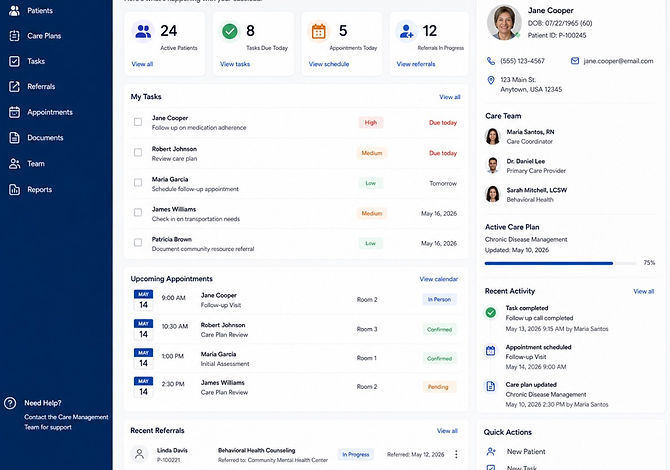
Modernize clinical operations and administrative workflows with native Microsoft 365 tools designed for high-security environments. We help healthcare organizations leverage the platform they already own to handle sensitive information with precision and control.
Healthcare Operations Are Often More Manual Than They Need to Be
Healthcare operations are built on sensitive patient data and complex workflows. Simply moving to the cloud isn't enough; you need a strategy that protects data without breaking the process.
Manual Processes
Replacing slow, paper-based administrative tasks with secure digital tools to speed up care delivery.
Spreadsheet Dependency
Moving clinical data out of ungoverned spreadsheets into centralized, secure Microsoft 365 databases.
Document Sprawl
Eliminating fragmented filing systems and ensuring PHI is stored in controlled, searchable environments.
Disconnected Workflows
Unifying patient intake, provider credentialing, and case management into a single secure platform.
Limited Visibility
Fixing blind spots with real-time dashboards and audit logs built specifically for healthcare visibility.
Underused Microsoft 365
Turning existing licenses into powerful clinical applications instead of just using email and chat.
What We Design
Microsoft 365 Solutions Built Around Healthcare Operations
POWER APPS
Business Applications
Custom tools for patient tracking and provider management built on your existing Microsoft 365 tenant.
AUTOMATE
Process Automation
Standardizing clinical processes through Power Automate with auditable approval chains and secure data handling.
INTRANET
SharePoint
Centralized, secure hubs for clinical documentation, policies, and internal healthcare communications.
GOVERNANCE
Document Management
Configuring backup, retention, and deletion policies to maintain data integrity and meet lifecycle requirements.
OPERATIONS
Case Management
Structured systems to manage patient cases, referrals, and incidents from intake to resolution.
ANALYTICS
Data & Reporting
Real-time Power BI dashboards providing operational insights while respecting strict data access controls.
COLLABORATION
Microsoft Teams
Secure hubs for clinical team collaboration, virtual huddles, and HIPAA-aligned internal messaging.
ARCHITECTURE
Dataverse
Enterprise-grade data storage for complex healthcare relationships with row-level security and encryption.
Popular M365 & Power Apps Solutions
Provider Credentialing
Coordinate patient-related tasks, referrals, follow-ups, assignments, and care-team activities through a centralized Power App.
Care Coordination
Allow staff to submit requests through a secure, easy-to-use application with automated routing and tracking.
Room & Resource Scheduling
Manage shared rooms, equipment, conference spaces, treatment areas, and other healthcare resources through a centralized scheduling app.
Employee Onboarding
Coordinate HR, IT, managers, documentation, training, equipment, and onboarding tasks through an automated workflow.
Incident & Event Reporting
Capture incidents, safety events, privacy concerns, corrective actions, assignments, and follow-up through a structured application.
Staff & Shift Scheduling
Simplify staff availability, shift requests, schedule coordination, coverage needs, and manager approvals.
Patient Referral Tracking
Track referrals, assignments, status, required documents, follow-up activities, and outstanding actions across teams.
Policy & Compliance Management
Centralize policies, automate review cycles, manage versions, track acknowledgements, and notify owners when reviews are due.
Operational Request Management
Digitize requests for equipment, facilities, supplies, schedule changes, administrative support, and other internal services.
Discharge Follow-up
Track post-discharge tasks, outreach, appointments, and outstanding follow-up actions.
Our Approach
Designed to Work Within Your Existing Microsoft Framework
01
Discover
Learn about your organization, mission, challenges, and goals so we understand what matters most.
02
Prioritize
Identify opportunities that will deliver the greatest impact with the least disruption.
03
Design
Create solutions that align people, processes, and technology around how your teams actually work.
04
Implement
Deploy practical Microsoft 365 solutions with clear communication and change support.
05
Support
Provide ongoing guidance, training, and enhancements as your organization and needs evolve.
Frequently asked questions
